
A QR code that never expires can be free when it is static: its destination is encoded in the pattern, so it doesn’t depend on a QR service staying online. NO QR CODE’s codes never expire, and its QR Code Generator is free with no sign-up. A static code keeps working as long as its destination remains available, but you can’t change that destination after printing.
It’s reasonable to want a code that stays usable without a subscription, while still leaving room to update a link later. Those are different requirements: static codes offer a lasting, direct route, while editable destinations rely on a dynamic service and its plan terms.
This guide explains how static and dynamic codes differ, what keeps a QR code working over time, and what to check before printing. NO QR CODE’s free QR Code Generator creates codes without sign-up, and its tools also include bulk generation, a scanner, and print guidance.
Key Takeaways
- Choose a static code when you want a lasting destination without relying on a QR service; keep the linked page available.
- Before using a free plan, compare its sign-up rules, branding, and limits on editable codes.
- Plan the destination before printing: a static code’s embedded link can’t be changed afterward.
- Compare generators by the files they let you download and how easily you can test the finished code.
Are permanent QR codes free?
Static QR codes can be free and work while their destination stays available; dynamic codes rely on a service. The printed pattern can still scan after hosted routing ends, so code expiration differs from generator-service expiration.
Static and Dynamic Code Expiration
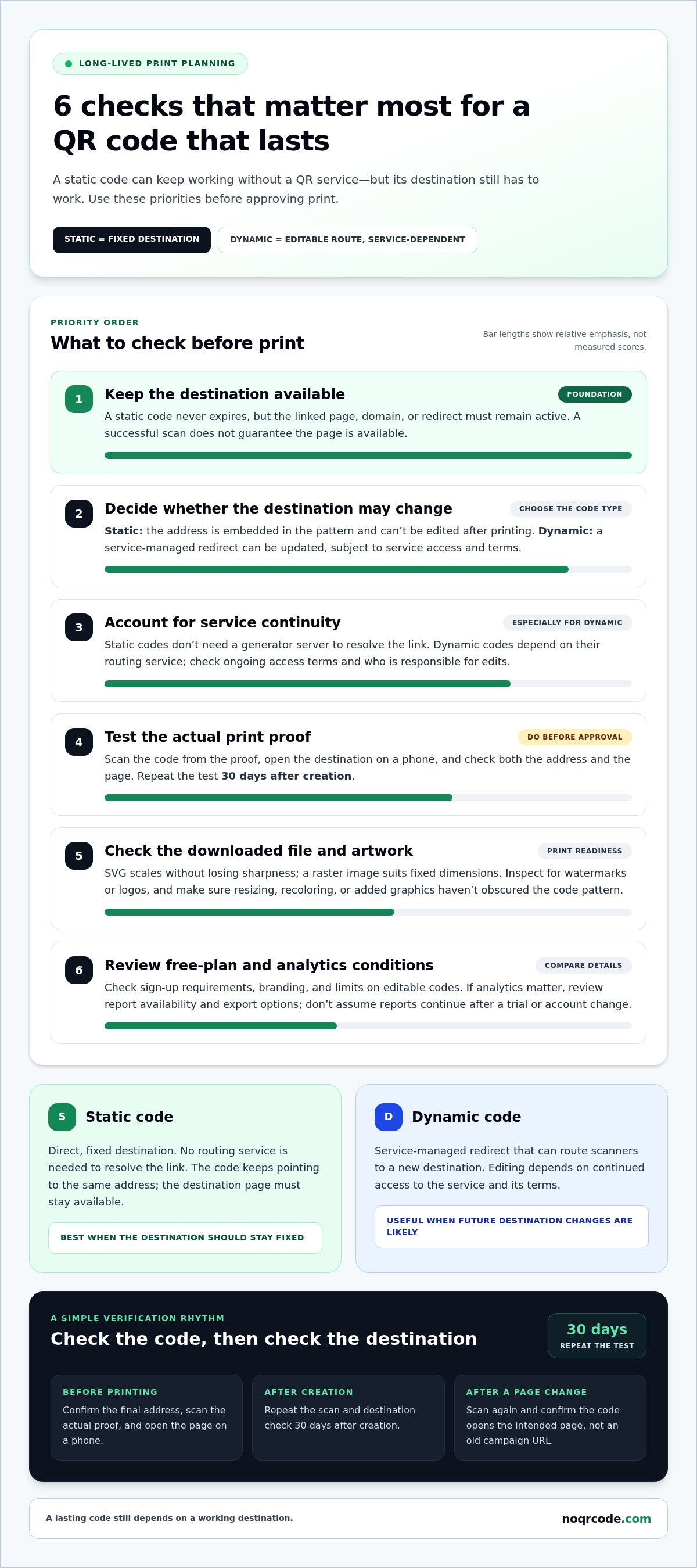
A static QR code stores its destination in its pattern, so it needs no generator server to resolve the link. The code never expires, but a web page must remain available for the link to work. Dynamic QR codes route through a service, so their function depends on that service. NO QR CODE’s QR Code Generator is free, requires no sign-up, and processes data locally in your browser.
QR Codes for Long-Lived Print
Packaging, signs, menus, and product inserts may stay in circulation after a campaign ends. For long-lived print, use a static code when its destination should remain fixed. The printed pattern can’t compensate for a deleted webpage. Dynamic QR codes offer an editable route when a destination may need an update, but service continuity becomes part of the print decision. A paid plan may carry ongoing access terms, so factor those into print planning.
Before approving a print file, scan the code from the actual proof and open its destination on a phone. Then repeat the test 30 days after creation. Check the address and the page itself: a scan can succeed while the destination is unavailable. For packaging or a sign, direct the code to a page you control when possible. That reduces reliance on a third-party page that could be removed.
Watermarks, sign-up requirements, and free-tier limits
Free generators can be used safely, but a QR code doesn’t verify its destination. Before printing, scan the code and inspect the link; avoid directing people to login or payment pages you don’t control.
Review the download before approving a label, poster, or package design. A watermark or logo may appear in the code or beside it, changing the finished artwork. Check that the code remains clear and that any added graphic doesn’t cover its pattern. If a service requires an account, read what information registration collects and whether access depends on keeping that account active.
Before choosing a generator, check whether it creates static codes or redirects managed by a service. A static code encodes its destination directly and doesn’t depend on a routing service. NO QR CODE’s QR codes never expire, and its generator is free with no sign-up or usage limit.
Analytics also vary. A dynamic code may report scans or related activity, while a static code doesn’t rely on a tracking dashboard. Decide whether scan counts or location data are useful before choosing a plan, then review how long reports remain available and whether you can export them. Don’t assume analytics continue after a trial or account change.
Even a correctly printed code can lead nowhere if its destination page, domain, or redirect stops working. Keep the destination online and test it after changes to the page or hosting. For a straightforward static code, use a static QR code generator and scan the downloaded file before printing.
Changing a destination after printing
A static printed code contains its destination in the pattern itself. The pattern keeps decoding to the same address, so it can’t be edited after printing. If a restaurant prints a static code for a menu, changing the menu URL means creating a new code and replacing the printed materials, unless the original address remains active and redirects to the new menu.
Dynamic codes work differently. The printed pattern points to a redirect managed by a service, which can route scanners to a new destination. For example, a campaign team can update a product page without changing the code on its posters. The printed code stays the same, but its editability depends on continued access to the service and its terms.
Before choosing dynamic codes, map out likely campaign changes. List which destinations may change, who needs permission to edit them, and how redirects will be managed. For long-lived packaging or signs, consider whether a fixed destination is more reliable for your needs. NO QR CODE’s static QR codes never expire and remain useful as long as their destination stays active.
- For a fixed destination: Use a static code, then confirm the page address before sending the design to print.
- For likely changes: Choose a dynamic code and document the account responsible for editing its destination.
- After an update: Scan the printed code and confirm it opens the new page, not an old campaign URL.
Keep the destination under your control where possible. If a third-party page disappears, a static code still opens the same address, but that address may no longer serve visitors. For long-lived print, decide whether a predictable, fixed destination or future editability matters more. No code can keep a destination available forever; the page and any redirect must remain active.
Free static QR code generator comparisons
A useful comparison looks beyond whether a generator creates a scannable image. A 2026 evaluation tested 12 free QR code generators, offering a practical model: compare code type, download format, account requirements, and limits. Focus on static QR codes if you need a fixed destination without ongoing redirect management. Then inspect the actual file before using it in a design.
Start with the destination. Enter the final webpage address, generate the code, and scan it with a phone. Confirm that the landing page matches your intended use, such as a product guide or event details. A generator can encode the wrong address perfectly, so check every character, including punctuation, before exporting. NO QR CODE’s QR Code Generator processes data locally in your browser.
Next, check the output and its print readiness. Choose a file format suited to your layout: a vector SVG scales without losing sharpness, while a raster image suits fixed dimensions. Check that resizing or recoloring hasn’t obscured the pattern. Longer URLs contain more data and can create denser patterns, so scan the final artwork at its intended size. NO QR CODE says its downloads include vector SVG and 300 DPI PNG files.
- Destination: Confirm the complete URL and open it from a scan.
- Code type: Verify that the generator creates a static code rather than a service-dependent dynamic code.
- Export: Check file format, image clarity, and any watermark before printing.
- Terms: Review sign-up conditions, code limits, and whether generated codes remain active.
For bulk work, also check whether each code can contain a different destination and whether the filenames help you match codes to products. Keep a record of each destination alongside its corresponding artwork. That simple step helps prevent a packaging mix-up when several static codes look alike.
Use these checks to choose a generator that fits the job, then create a static QR code for your chosen destination.
NO QR CODE (NOQRCODE.COM): QR Code Generator
NO QR CODE (NOQRCODE.COM) offers a QR Code Generator for creating static codes when you want a fixed destination without a sign-up step. Its QR codes are 100% free and never expire, provided the destination page remains available. That makes it a practical fit for a menu, product page, or event information that won’t need an editable redirect.
Download the code as an SVG vector file or a 300 DPI PNG, then scan the exported image before sending it to print. If you need multiple unique codes, use a bulk workflow; if you need to read an existing code, use a QR & Barcode Scanner. Choose the tool that matches your task, and keep the destination page active.
Visit noqrcode.com to create a QR code for your destination.
Make the destination part of the plan
Treat the destination as part of the printed asset, not an afterthought. Before approving a design, decide who owns the page, who will maintain it, and what should happen if its content changes. Keep the final destination and its matching QR artwork together in your project files. NO QR CODE’s QR Code Generator and Bulk Code Generator & ZIP Export help you create and organize codes for print.
A QR code that never expires still depends on a destination that remains useful. Assign a page owner, preserve the source artwork, and include destination checks in your content update process. This keeps each printed code connected to a working page instead of leaving it as an unexplained graphic.
NO QR CODE (NOQRCODE.COM) offers a QR Code Generator, Barcode Generator, and QR & Barcode Scanner for related code tasks. Visit noqrcode.com to explore the tools for your next project. Choose the workflow that fits your needs and move forward with a clear destination.
Frequently Asked Questions
Can I change the link after printing my QR code?
Not if the printed code directly encodes the original web address. For example, a static code pointing to an old menu URL can’t be edited; you’ll need to replace the print or keep that address active and redirect it to the new menu. A dynamic code can use an editable redirect, but changes depend on the service managing that redirect.
Do QR codes last forever?
A QR code that never expires can still lose its usefulness if its destination stops working. A code containing Wi-Fi details works only while those credentials remain valid; a web address needs an active page or redirect. Physical damage can also make a printed code unreadable. Save the original code file so you can reproduce it if the print is damaged.
If a QR code never expires, why would I ever pay?
A QR code that never expires may be all you need when a fixed destination works for your purposes. NO QR CODE’s QR Code Generator is free, requires no sign-up, and creates codes that never expire. Static codes remain functional as long as their destination is active. Create your code with NO QR CODE and scan the finished design before printing.
Is there a limit on scans?
A QR pattern itself doesn’t count scans or set a scan allowance. A service that routes dynamic codes or records analytics may apply its own limits, so review its terms before using one for a high-traffic poster or product package. To measure visits without a QR dashboard, use a destination page with your own analytics setup and keep its tracking configuration active.
What About Other Popular "Free" Generators?
Compare each generator’s actual output rather than relying on a “free” label. Check whether it creates static codes or service-dependent redirects, adds branding, requires an account, or limits downloads and analytics. Generate a test code, scan it, and inspect the destination. For a code used in a printed campaign, also save the exported file and note the URL it contains.
What actually makes a QR code permanent?
A static code is permanent in the sense that its pattern continues to encode the same information. For a web link, the page or redirect must also remain available; for Wi-Fi, the network credentials must still work. Keep control of the encoded destination and retain the original image file. NO QR CODE’s free QR Code Generator creates codes that never expire, and you can start using it without signing up.


